

Analytics Page (Pro)
This page covers Analytics in NoCopium Trade Journal Pro — the workspace for deciding what to keep, change, or stop.
Open NoCopium Trade Journal → Analytics, or click Full analytics on the Dashboard (that keeps your current date range and account).
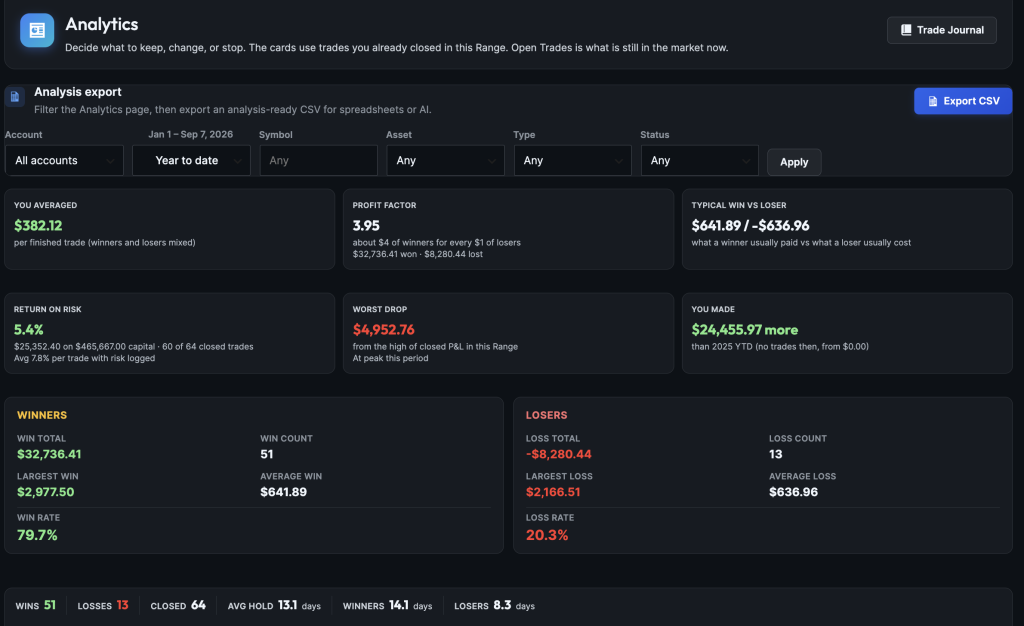
IMAGE: analytics-overview — Edge strip, P&L mix, strategy and underlying tables, plan, mindset, open trades
What it does
It breaks down closed trades by setup, ticker, hold habits, rolls, plan and mindset tags, and shows what is still open. Net P&L and win rate stay on the Dashboard.
Why it matters
Come here when a high win rate is not enough — you want to know which structures pay, which lose with enough trades to matter, and whether process (plan / mindset) is the real leak.
Important
Analytics is part of NoCopium Trade Journal Pro only. If a number looks too good to be true, read When a number looks crazy before you size up.
How to use this page
- Pick one account if you have more than one (mixing IRA and taxable muddies the picture).
- On Analysis export, set Range and any filters, then click Apply.
- Use a Range with enough closes (last 3 months or year to date is a start). One quiet month is a pulse, not a verdict.
Then walk the page top to bottom:
- Check your average trade. Are you averaging a profit per finished trade? Are losers bigger than winners?
- Check winners vs losers. Are you making enough on winners to cover your losses?
- Check your hold times. Are you cutting winners and riding losers?
- Check your P&L mix. Are you mostly scratching, collecting a few big wins, or taking an occasional ugly loss?
- Check your setups. Which strategy names are making money? Which are losing with enough trades to matter?
- Check rolls. How do linked rolls show up in the numbers?
- Check by ticker. Same questions, grouped by underlying.
- Check plan tags. Did you follow the plan on close? (Skip if you never tagged.)
- Check mindset tags. How did you feel at open? (Skip if you never tagged.)
- Check IVR / VIX / asset class — only if you logged them.
- Check what is still open (nearest expiration first).
If a number looks too good to be true, read When a number looks crazy before you size up.
Analysis export (filters + CSV)
At the top of Analytics sits the Analysis export card. Use it to set Account, Range, and other filters, then Apply. Export CSV sits on the same line as the title and downloads a spreadsheet of the current filters (for Excel or AI).
| Control | What it does |
|---|---|
| Export CSV | On the same line as the title. Downloads a spreadsheet of the current filters (for Excel or AI). |
| Account / Range | Which book and which dates (same Range menu as the Dashboard). No custom dates here. |
| Symbol / Asset / Type / Status | Narrow the page and the CSV |
| Apply | Reloads the page. Changing a dropdown does nothing until you click Apply (or press Enter in Symbol). |

IMAGE: analytics-export — Analysis export header with Export CSV; filter row with Apply
Status → Open hides the closed-trade cards (nothing to calculate yet) and shows Open Trades only. Use Any, Closed, Wins, or Losses for the rest.
What “closed” means here
A trade is one journal row (usually one Tastytrade Order #), not each CSV fill line.
Closed = Win, Loss, or Breakeven, counted on the exit date inside your Range.
Open trades are not in expectancy, profit factor, strategy tables, or drawdown. They only show under Open Trades.
Needs Review rows are left out until you fix them in the journal.
Edge strip (the top cards)
Win rate stays on the Dashboard on purpose — a high win rate with fat losers is how premium sellers fool themselves.
| Card | Plain English |
|---|---|
| You averaged | Average dollars per finished trade (wins, losses, and scratches together). Not the same as “average win.” Not return on your IRA. |
| Profit Factor | Dollars won ÷ dollars lost. Above 1 means winners paid more than losers cost. A huge number (8, 50…) usually means this Range had almost no real losses — not a miracle system. |
| Typical win vs loser | Average size of a winner vs average size of a loser. If losers are bigger, you need more wins (or fewer disasters). |
| Return on risk | Total P&L ÷ capital you logged (prefers broker buying power / BPR). Compare to your broker. Log BPR on /ES and IRA short strangles when the estimate looks wrong. |
| Worst drop | Biggest slide from the high of closed P&L in this Range. Opens do not count. Under ~10 closes, treat it as noise. |
| You made | How much more or less you made than the previous stretch of the same length — not this Range’s total P&L. See below. |
The Winners / Losers cards sit under the strip. The hold-time line shows how long you typically hold winners vs losers. If winners are held shorter than losers, you may be taking crumbs and trading dogs.
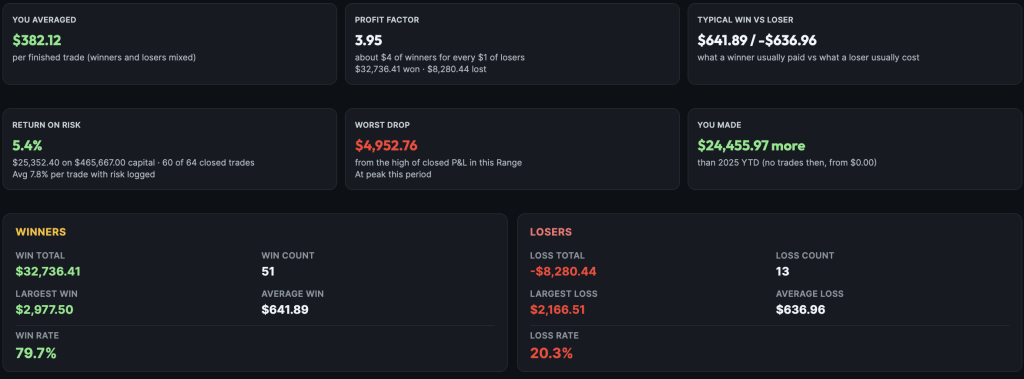
IMAGE: analytics-edge — Edge strip, Winners/Losers cards, and hold-time line
“You made” example
Range = Last 3 months. The card might say you made $11,847 more than the prior ~90 days. That is total dollars vs the last stretch — not per trade.
| Range you pick | “Prior” means |
|---|---|
| Year to date | Same YTD window last year |
| Month / quarter / last 3–12 months / last few years | Same length of time right before this Range |
| All time | No comparison (—) |
Losing with 10+ trades
Yellow callouts list names that are down on dollars in this Range and have at least 10 closed trades. That is not “your whole account is blowing up.” Other names can still be green. Opens do not count.
| Name | Closes | Net | Callout? |
|---|---|---|---|
| Iron Condor | 18 | −$1,850 | Yes |
| Poor man’s covered call | 3 | −$900 | No (thin sample) |
| SPX | 40 | +$6,100 | No (it made money) |
Keep names that are up with enough trades to matter. Stop or shrink names on the callout. Wait on thin samples.
When a number looks crazy
The math is fine. The date window is usually the surprise.
- Huge profit factor → almost no losses closed in this Range (maybe losers are still Open, Needs Review, or closed last year).
- Worst drop near $0 with a huge PF → same story.
- Empty IVR after import → normal; the CSV has no IV rank.
- You made looks huge next to You averaged → one is a sum vs last time; one is an average.
Open the Trade Journal on the same account and dates if you want to see the rows behind a card.
Strategy table (and underlying)
Every setup in the Range, ranked by net P&L.
- Keep names that are up with enough trades to matter.
- Stop or shrink names on the Losing with 10+ trades line.
- Change a name that “wins a lot” but has a poor average (nickels in front of a truck).
- Strategy Not Confirmed is a junk bucket until you tag it.
- Import cannot join multi-order “campaigns” (LEAP + later short). Retag in the journal if you want reports to treat them as one trade.
Click trade counts to open the journal. Analytics uses close date; the journal date filter often uses open date — counts can differ a little.
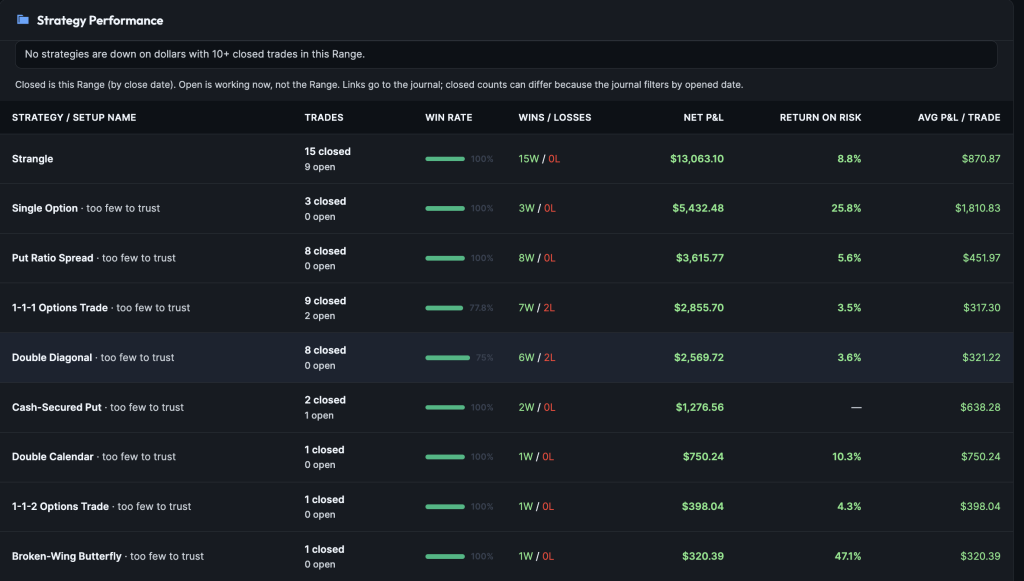
IMAGE: analytics-strategies — Full strategy table with losing-with-10+ line
Underlying is the same kind of table, grouped by ticker instead of setup name.
Hold, mix, rolling, plan, mindset
Hold / streaks — average days held; streak text is a tilt check, not a setup verdict.
Closed P&L mix — how many finishes landed in each dollar bucket (small / medium / large wins and losses, plus scratches).
Rolling — how often linked rolls show up, premium from roll tickets, and closed ticket P&L inside rolled groups vs outside. Linking does not change broker cash. See Rolling & linked trades.
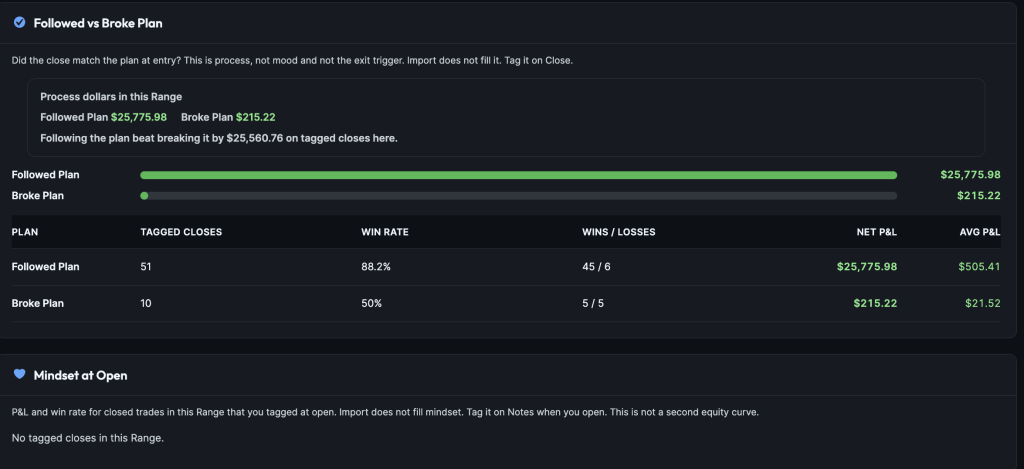
Followed vs Broke Plan — process P&L for closes you tagged. Import does not fill this.
Mindset at open — P&L by how you felt when you put it on (only tagged trades). A tag with three trades is a hint, not a stop.
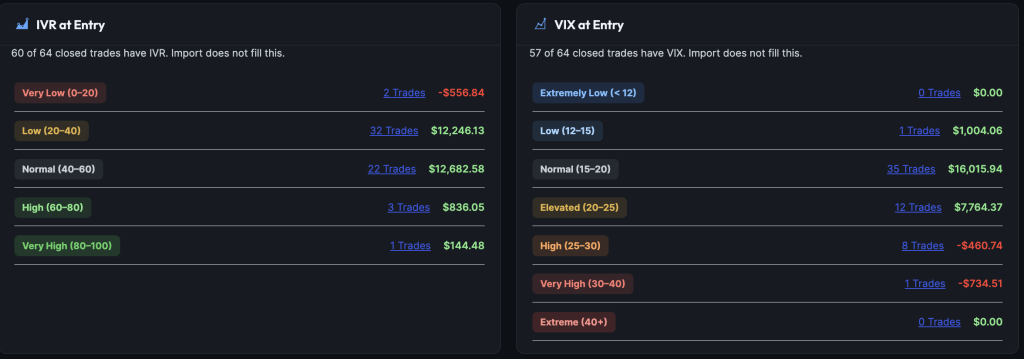
IVR, VIX, asset class
Only trades where you typed the value. Import does not fill IVR or VIX. If the line says 0 of M have IVR, skip the buckets.
IVR is how rich/cheap that symbol’s vol looked at entry. VIX is the S&P fear gauge in points (most useful on /ES, SPX, SPY). Asset class shows which product type made or lost money.
Open trades
Right now, not the Range. Sorted by nearest expiration.
Work from the top: what expires soonest, and do you have a plan? Buying power may be typed, filled by Pro, or blank. Short puts and strangles often show undefined max loss until you log BPR or a plan stop.
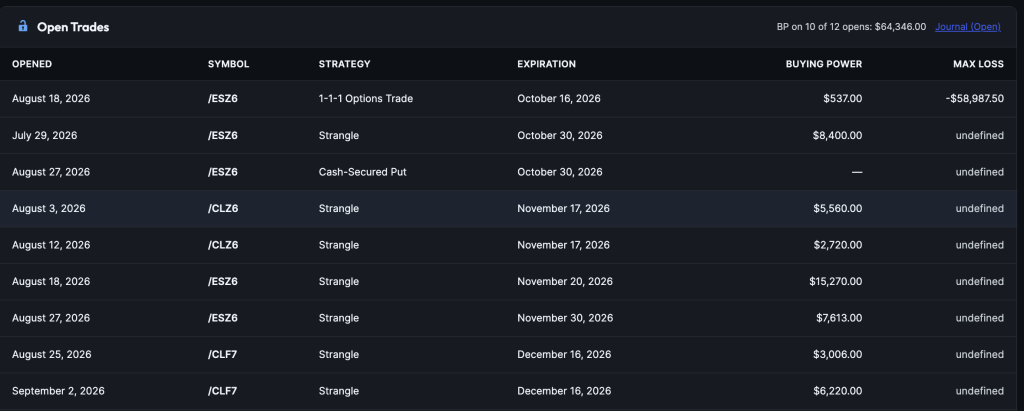
IMAGE: analytics-open-trades — Open positions by expiration
What this page is not
- Not portfolio CAGR, Sharpe, or IRA return — it measures trade results
- Not a live broker risk board
- Not where you log trades
- Not a reason to size up on a 50 profit factor in a quiet Range
- Export CSV is for analysis — not a full-site backup (use Settings → Backup)
Free vs Pro
| NoCopium Trade Journal | NoCopium Trade Journal Pro | |
|---|---|---|
| Analytics menu | — | Yes |
| Dashboard snapshot | Yes | Same + more Range / Profit Factor / top strategies |
| Edge strip, tables, drawdown, open risk | — | This page |
| Analysis export + CSV | — | Yes |